How to update data that has disabled update btn?
Find out the reason
Firstly, Figure Out the reason of buttons being disabled by looking at the color of the Cross in Closing Status column. The blue indicates Daily Closing while the red indicates Monthly Closing.
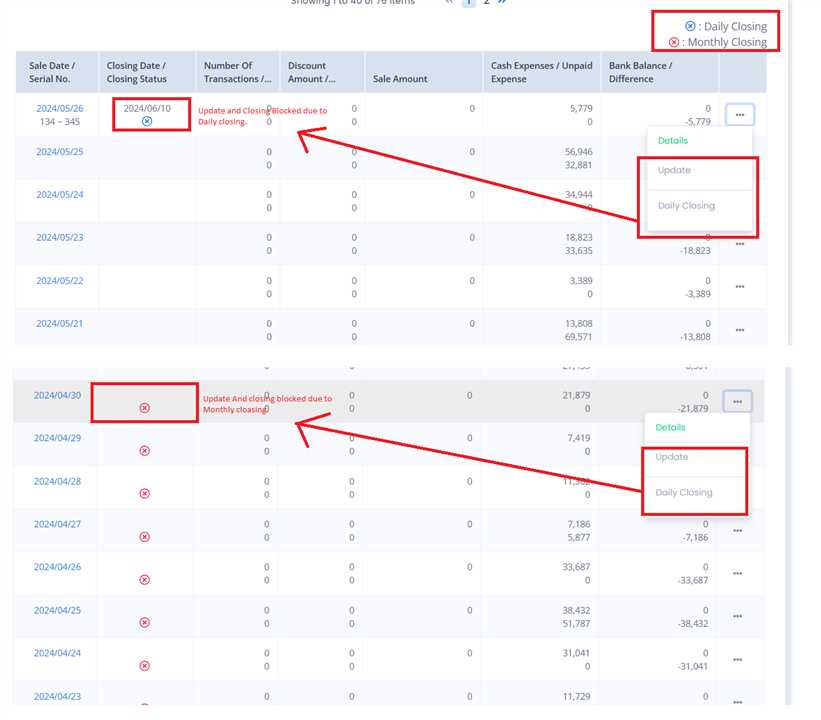
Unblocking the Buttons disabled by Daily Closing
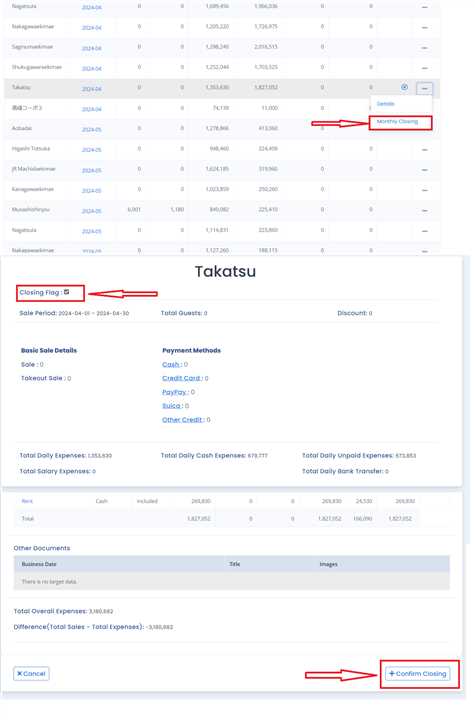
If the closing status of the particular row has a blue cross, Login through Company Manager account, go to Daily closing page and click on daily closing button as shown in the image. After that, Untick the Closing Flag Checkbox at the top of the page and Click 'Confirm Closing' Button at the bottom right corner. This Should Undo the Closing and Enable the Update button. Now you can update the data as usual.

Unblocking the Buttons disabled by Monthly Closing
If the closing status of the particular row has a Red cross, Login through Company Manager account, go to Monthly closing page and click on Monthly closing button as shown in the image. After that, Untick the Closing Flag Checkbox at the top of the page and Click 'Confirm Closing' Button at the bottom right corner. This Should Undo the Closing and Enable the Update button. Now you can update the data as usual.