Logo
  • Getting Started
  • Categories
    • Initial Setting
    • Registration
    • Expenses
    • Sale
    • Order
    • Daily Closing
    • Accounting
    • COO (Customer Online Order)
    • CTO (Customer Tablet Order)
    • Printer
    • Monthly Closing
    • Other Uploads
    • Customer Display
    • Seats Settings
    • Features of POS App
  • Contact Us
  • English jpnflg
    engflg English engflg 日本語 engflg नेपाली
  1. Categories
  2. Registration
  3. Party Course
  4. Steps to view detail of Party Course

Steps to view detail of Party Course


How to view detail of Party Course?

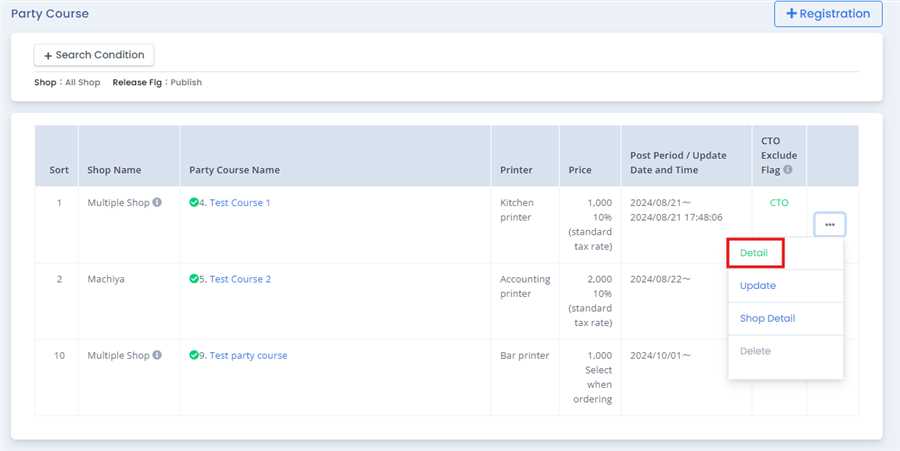
User can press Detail button after pressing ... tab of the respective party course in Party Course List.
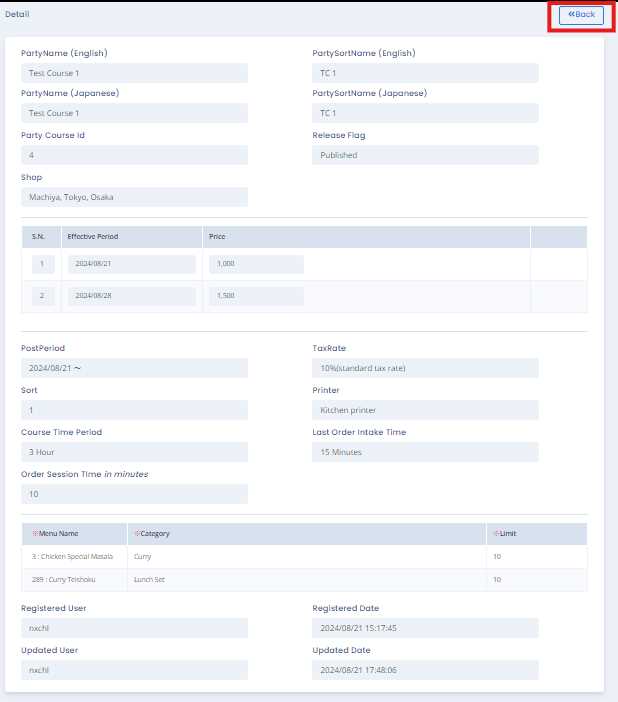
After pressing Detail button a form opens up which gives detail of the respective Party COurse.User can return to the party course list by pressing Back button.By this process/ procedure you can simply view detail of Party Course in the POS system.

Categories
Initial Setting
Registration
Expenses
Sale
Order
Daily Closing
Accounting
COO (Customer Online Order)
CTO (Customer Tablet Order)
Printer
Monthly Closing
Other Uploads
Customer Display
Seats Settings
Features of POS App
FAQ

Namaste International LLC

ナマステ・インターナショナル合同会社

Products
  • POS (Point On Sale)
    • Sakura POS
    • Sakura Reji
    • Himal POS
  • Order Management System
  • CTO (Customer Table Order)
  • Ryoriten (Customer Online Order)
Information
  • FAQ
  • Getting Started
  • Inquiry
  • Privacy Policy
Contact Us
  • 2-21-22 Machiya, Arakawa-ku, Tokyo 116-0001
  • (+81) 080 4080 2044
  • jpnflg English
    engflg English engflg 日本語 engflg नेपाली
© 2025 Namaste International LLC. All Right Reserved.
×