Get IP Address of the Printer
The printer can perform a test print.In the test print, information such as firmware version and setting values of the function settings are printed.Follow the following instructions to print the test print slip.
1) Install the thermal paper in the printer as instructed above.Ensure that no error occurs, and then turn off the printer.
2)Hold the FEED switch down and press the POWER switch,then release the FEED switch when the test print has been started.
3)The printer cuts the paper and returns to the print-ready status when the test print has completed,and ip address of the printer is inside the communication type section at the bottom section of the slip.
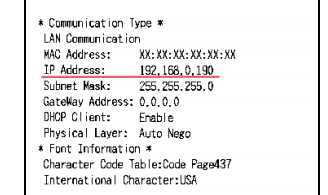
Finally a slip is printed which contains the information of the printer and its network informations like ip address,DHCP client etc
