Getting Started
Categories
Initial Setting
Registration
Expenses
Sale
Order
Daily Closing
Accounting
COO (Customer Online Order)
CTO (Customer Tablet Order)
Printer
Monthly Closing
Other Uploads
Customer Display
Seats Settings
Features of POS App
Contact Us
English
English
日本語
नेपाली
Categories
Seats Settings
Seat Registration/ Update / Delete
Seat Delete Process
Seat Delete Process
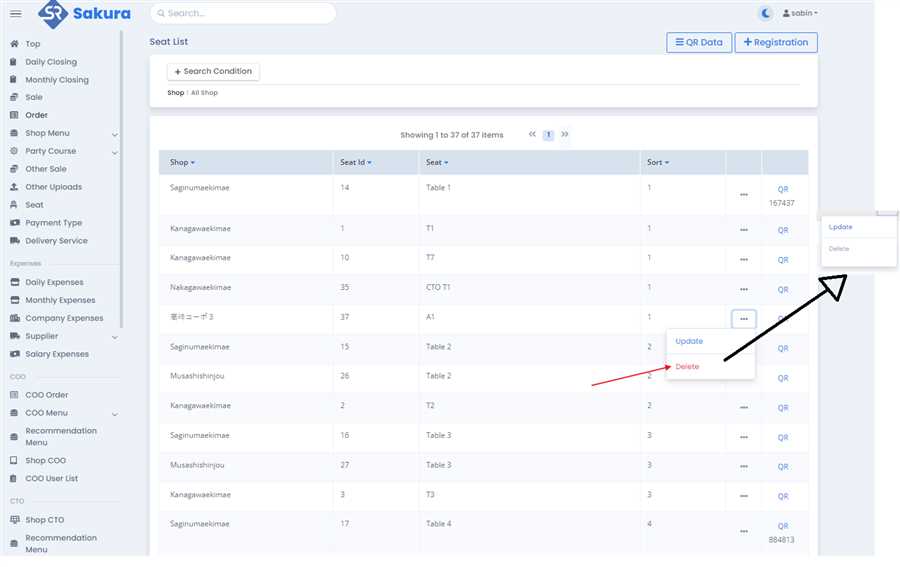
Initial Stage: Delete Button Active (Clickable)
Before the seat is used
in any business transaction, the
Delete
button (three dots menu in the first image) next to each seat remains
active
and clickable.
At this point, since the seat has not been associated with any transaction (e.g., no customers have been assigned to that seat), it is possible to delete it.
Seat Usage: Delete Button Deactivated (Unclickable)
Once the seat is used
in any business process (e.g., assigned to a customer for an order or payment):
The system automatically
disables
the
Delete
button for that seat, making it unclickable.
This means the seat can no longer be deleted since it is now associated with historical data (orders, payments, etc.).
Process for Handling Delete Button State
Before Usage (Active Delete Button):
The
Delete
option is available when the seat has no dependent data or is not tied to any business process. You can click the
Delete
button to remove the seat from the system.
After Usage (Disabled Delete Button):
Once the seat has been used in a transaction, the
Delete
button becomes
disabled
. This ensures that the seat's historical data is preserved for business reporting or audit purposes.
The button is visually altered (likely grayed out or unclickable) to indicate that deletion is no longer possible.
While the Delete Button Active (Clickable)
Before the seat is used
in any business transaction, the
Delete
button next to each seat remains
active
and clickable so to delete it you can click that button to delete the seat in case of mistak ewhile creating before usages.
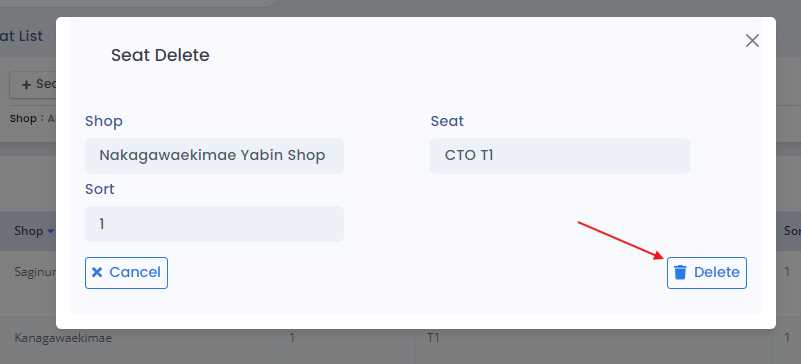
At this point, after clicking deleate button the deleated from is open
That form will shows the name of seat and relative information
Click on the Delete Button on the Right Lower corner. (if you want to cancle the delete you can perfromed by clicking on cancle button )
Why the Delete Button is Active:
The
Delete
button is active (clickable) when the seat
has not been used
yet. This means the seat can be deleted because no customers or transactions have been linked to it.
Why the Delete Button is Inactive:
The
Delete
button becomes inactive (unclickable) when the seat
has been used
in your business. Once a seat is linked to any customer or transaction, it cannot be deleted to keep your records complete and accurate.
Categories
Initial Setting
Registration
Expenses
Sale
Order
Daily Closing
Accounting
COO (Customer Online Order)
CTO (Customer Tablet Order)
Printer
Monthly Closing
Other Uploads
Customer Display
Seats Settings
Features of POS App
×