Steps to Download Employee Certificate :
Navigate to the Certificate Download Page:
- Log in to your Sakura POS account.
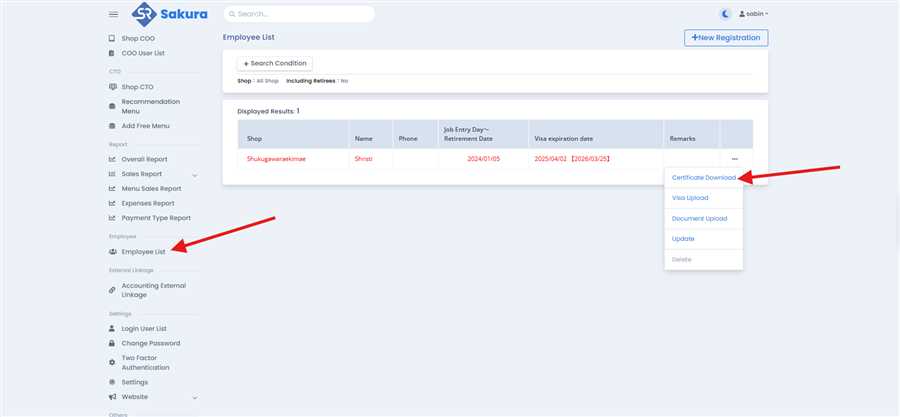
- From the left sidebar, select the "Employe List" section.
- Then you will see the differe employee list, from that list select one and click on action button at the last column of that row,
- Then click on "Certificate Download" section to open the form as shown in figure above.
After opening the Employee Certificate Download page you will see the detail of that employee and at the top there is certificate download buttons from where you can download the certificate of employment in japanese and in english language also you will see the Certificate if retirement download in both langauge.
Below there is detail of that employee with family information
On Clicking on that certificate button Certificate will open with download and close button then click on download button to download the respective certificate .
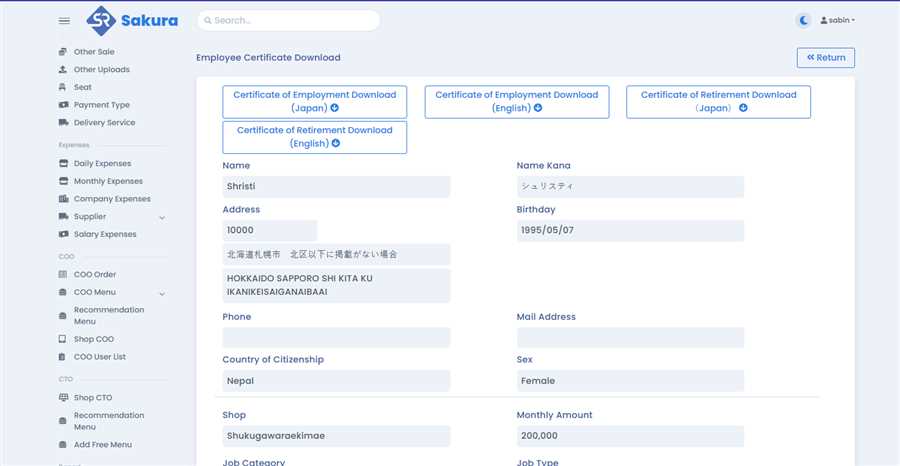
-- To Download the Certificate of employment in japanese language you can click on the first button.
-- To Download the Certificate of employement in english language you can click on the second button.
-- To Download the Certificate of retirementin japanes language you can click on the third button.
-- To Download the certificate of retirement in english languages you can clck on the fourth button .
